Why rent makes your budget look broken in the first week
· 5 min read
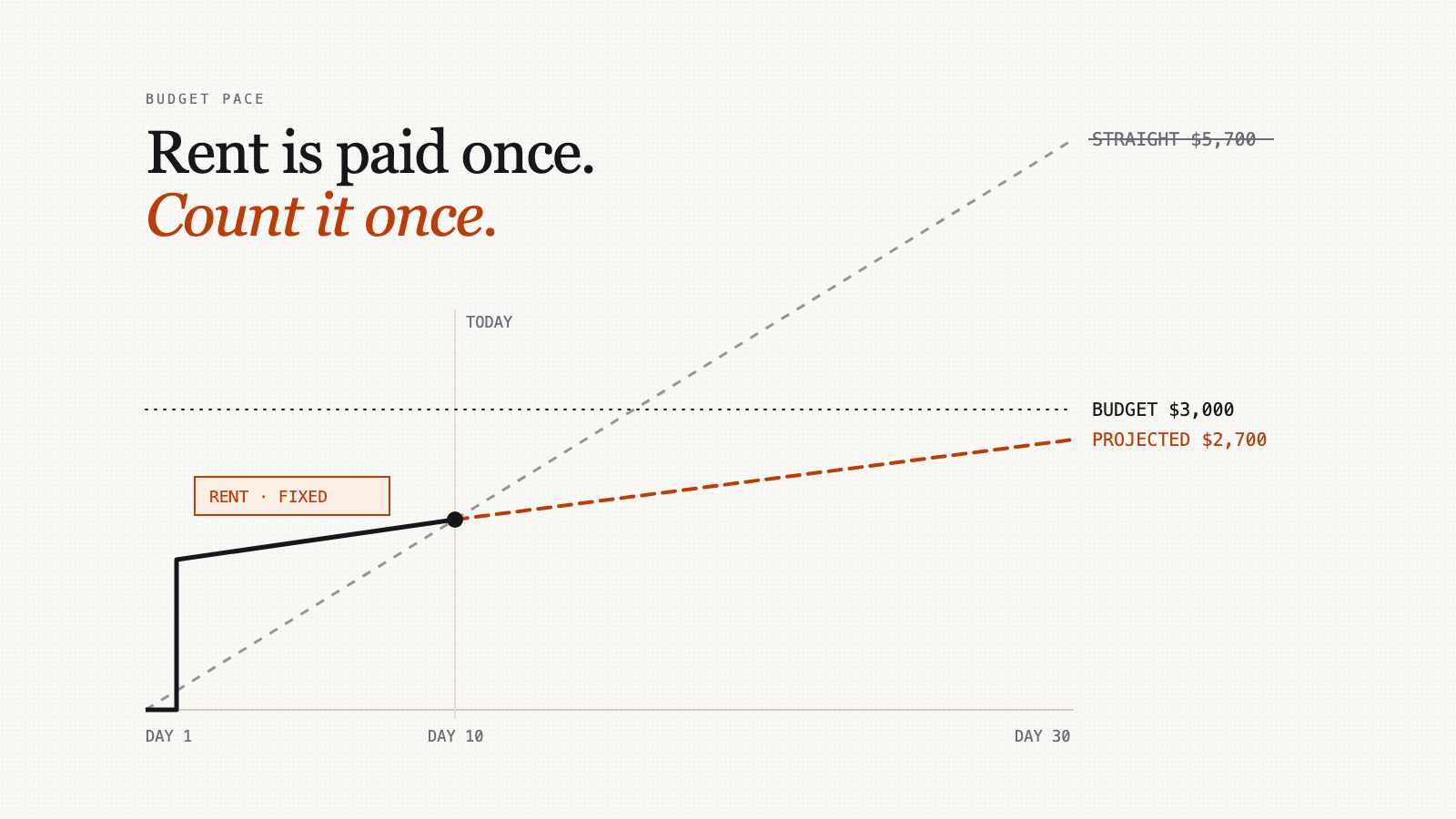
Rent leaves your account on the 1st and, by the 3rd, your budget app says you're on course to blow through your budget several times over. Nothing is wrong with your month. Something is wrong with the maths.
The straight line, and where it breaks
Most budget projections do one sum: what you've spent so far, divided by the days gone, multiplied by the days in the month. It's a fine way to project coffee, groceries and gas, which trickle out a bit at a time.
Rent doesn't trickle. It lands once, in full, usually early. A straight line treats it as if you'll pay it again every few days for the rest of the month.
Here's an example. Say your monthly budget is $3,000, rent is $1,500 and comes out on the 1st, and it's the 10th of a 30-day month. Apart from rent, you've spent $400.
- Spent so far: $1,500 + $400 = $1,900
- Straight-line daily average: $1,900 ÷ 10 = $190 a day
- Projected month-end: $190 × 30 = $5,700
- Verdict: $2,700 over budget
That's nonsense. You won't pay rent again this month. The projection is panicking about a month that is going fine.
Split the month in two
The fix is to stop treating all spending as one stream. Split it:
- Fixed costs: bills you know in advance, paid in one go, that don't depend on what you do day to day. Rent or mortgage, a car loan payment, an insurance premium, childcare.
- Everything else: the spending you actually decide on, a bit at a time.
Count fixed costs once, in full. Project only the rest.
Same month, done that way:
- Fixed: $1,500, counted once
- Everything else: $400 ÷ 10 = $40 a day, × 30 = $1,200
- Projected month-end: $1,500 + $1,200 = $2,700
- Verdict: $300 under budget
And the useful number, what you can spend per day for the rest of the month: ($3,000 − $1,900) ÷ 20 days left = $55 a day.
The opposite mistake: rent that hasn't left yet
The first example makes a straight line look too gloomy. Move rent day and it gets too cheerful, which is worse.
Same budget, same $400 of spending by the 10th, but rent comes out on the 15th.
The straight line sees $400 over 10 days and projects $1,200. It says you're on track, with ($3,000 − $400) ÷ 20 = $130 a day to spend.
Spend $130 a day for 20 days and you've spent $3,000 by month-end, before the $1,500 rent arrives. You'd finish $1,500 over, having followed the app's advice exactly.
Split the month and the rent counts whether or not it's been paid. It's expected, so it's set aside:
- Projected: $1,500 + $1,200 = $2,700, the same as before
- Per day: ($3,000 − $400 − $1,500) ÷ 20 = $55 a day, the same as before
That's the test of a good projection: the day your landlord happens to take the money shouldn't change the answer.
Doing it by hand
If you budget in a spreadsheet, it's three formulas.
| What | Formula | Example |
|---|---|---|
| Projected month-end | fixed + (other spending ÷ days gone × days in month) | $1,500 + ($400 ÷ 10 × 30) = $2,700 |
| Left for the month | budget − spent − fixed not yet paid | $3,000 − $1,900 − $0 = $1,100 |
| Per day from here | left ÷ days remaining | $1,100 ÷ 20 = $55 |
"Fixed not yet paid" is the bit people forget. If rent hasn't come out, it still belongs in the budget's column of things already spoken for.
What counts as fixed
A short test: you know the amount before the month starts, it arrives in one go, and nothing you do this month changes it.
| Usually fixed | Usually not |
|---|---|
| Rent or mortgage | Groceries |
| Car loan or lease payment | Gas and transit |
| Insurance premiums | Restaurants and takeaway |
| Childcare or tuition instalments | Clothing |
| A loan repayment | A big shop at a warehouse store |
Two judgement calls:
- Bills that vary a little, like electricity, can go either way. If you count them as fixed, use an estimate. If the bill comes in higher, count the higher figure.
- Don't mark something fixed just because it's big. A $300 warehouse-store run on the 2nd is lumpy, but it's a choice. If you label it fixed, the projection stops telling you when your choices are adding up. Fixed is for things you can't change this month, not things you'd rather not think about.
How Xpento handles it now
The budget projection on Xpento's budget page used to have exactly this weakness. It now splits the month the way this post describes.
- Mortgage / Rent is fixed by default. You don't need to set anything up for the most common case.
- Any other budget line can be marked fixed with a Fixed cost checkbox when you edit your budget, on the web or in the mobile app. Fixed lines show a small Fixed tag.
- Fixed lines count in full, whether or not they're paid yet. A fixed line counts at the larger of its budget and what you've spent on it, so an unpaid bill is still expected, and a bill that came in higher counts at the higher amount.
- Only the rest of your spending is held to a daily pace. The daily allowance on the "On track" banner leaves out fixed costs you haven't paid yet, and the banner says which fixed costs it included.
One thing to set up: give the rent line its own budget amount. If it has no amount and rent hasn't come out yet, there's nothing for the projection to expect until the payment shows up. If you've set rent up as a recurring expense, Xpento adds it on the day it's due, and from then on it counts as paid.
Do this today
Write down your fixed costs for this month: what each one is, how much, and whether it's been paid yet. Take their total off your budget. What's left is the money you actually decide about, and it's the only part worth projecting. In most months it's a much smaller number than the budget at the top of the page, and a much more honest one.